Linux常用命令
grep
-i, --ignore-case忽略大小写-n显示行号-v反向匹配-R递归搜索目录-o, --only-matching仅打印匹配的文本-E, --extended_regexp扩展正则(替代旧的egrep)-c统计匹配行数-l只显示哪些文件匹配,不显示匹配内容-H正常显示匹配内容,同时在每一行前显示文件名
常用组合
grep -Hn --color=auto 打印每个匹配项的文件名和行号,并带彩色输出
sed
sed 's/old/new/' file替换每行第一个oldsed 's/old/new/g' file全部替换sed -i 's/old/new/g' file直接修改文件,一般采用自动生成备份sed -i.bak 's/old/new/g' filesed '5d' file删第5行sed '5,10d' file删除5-10行sed '/DEBUG/d' file删匹配行(自带全局)sed -n '10p' file打印指定行sed -n '10,20p' file打印范围sed -n '/error/p' file匹配后打印sed '3s/foo/bar/' file替换指定行sed '3a hello' file在第3行后插入行sed '3i hello' file在第3行前插入行sed '3c hello' file替换第3行
常用组合
&
            echo 'hello 123 world' | sed -E 's/[0-9]+/[&]/'


            hello [123] world
& 表示整个正则匹配到的内容(用于不想改变匹配内容本身,只想在其前后添加东西)
捕获组
            echo "hello world" | sed -E 's/(hello) (world)/\2 \1/'


            world hello
\1 第1个捕获组
\2 第2个捕获组
awk
$0 整行
$n 第n列
$NF 最后一列
NF 列数
NR 行号
列操作
awk '{print $1}'打印第一列awk '{print $1, $2}'打印第一列和第二列awk '{print $0}'表示整行awk -F: '{print $1}'指定分隔符为:awk '$3 > 100 {print $1, $3}'第三列大于 100 的行,打印第一列和第三列。awk '$n ~ /error/ {print}'字符串匹配第n列(不写$n ~默认匹配$0)awk '$n !~ /error/ {print}'反向字符串匹配第n列(不写$n ~默认匹配$0)
计算
求和
            > awk '{sum += $1} END {print sum}' file


            10


            20


            30


            # 输出


            60
平均
awk '{sum += $1} END {print sum}'
统计
            awk '{count[$1]++} END {for (x in count) print x, count[x]}' file


            apple


            apple


            banana


            apple


            banana


            # 输出


            apple 3


            banana 2
命令结构
            awk '


            BEGIN {


                print "开始"


            }


            {


                print $1


            }


            END {


                print "结束"


            }


            ' file
执行顺序
            BEGIN


               ↓


            逐行读取文件


               ↓


            { ... }


               ↓


            END
example
awk '{sum += $1} END {print sum}' file
            每读取一行:


                sum += 第一列


            文件读完:


                print sum
文件描述符
| 编号 | 名称 | 含义 |
|---|---|---|
0 | stdin | 标准输入,默认来自键盘 |
1 | stdout | 标准输出,普通运行结果 |
2 | stderr | 标准错误,报错和警告 |
重定向符
>
覆盖写入,清空源文件再将stdout写入文件(即默认为1>)
            echo hello > output.txt


            # 完整写法为


            echo hello 1> output.txt
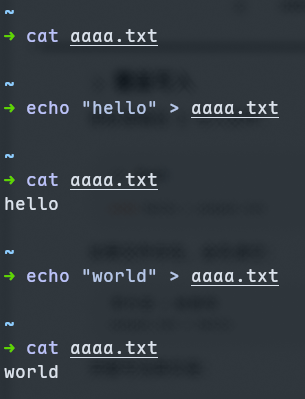
如果要重定向错误2不能省略
command 2> error.log
2>&1
把标准错误重定向到标准输出
&表示后面的数字为文件描述符,否则就被认定为文件名为1的文件
command > output.log 2>&1
执行顺序:
> output.log:让 stdout1指向文件。2>&1:让 stderr2指向 stdout 当前的位置。
普通输出和错误都会写入output.log
command 2>&1 > output.log
执行顺序:
- stderr先复制终端中的stdout
- stdout后来才重定向到文件
结果:
- stdout进入文件
- stderr仍显示在终端
1>&2
把标准输出重定向到标准错误(等价于>&2)
使用举例
            # 一般配合exit 1来自定义错误信息


            if [ ! -f config.toml ]; then


                echo "错误:找不到 config.toml" >&2


                exit 1


            fi
&>
同时重定向stdout和stderr,但是为bash和zsh支持的语法,不属于POSIX Shell,采用兼容写法
command > aaaa.txt 2>&1
>>
在文件后追加写入,和>用法一致
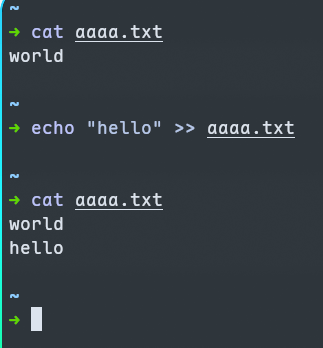
1>>&2和2>>&1不存在,只有&>>file,原因是:
>>表示以追加模式打开一个文件。>&表示复制一个文件描述符。- 文件描述符之间不存在“追加复制”这种写法。
&>>file
同时重定向stdout和stderr,但是依然为bash和zsh支持的语法,不属于POSIX Shell,使用下面的替代写法
command >> aaaa.txt 2>&1
<
从文件中读取输入(将文件作为命令的标准输入)
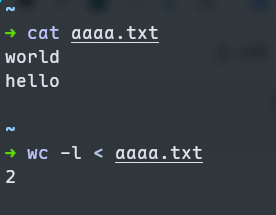
数据流为
aaaa.txt → stdin → wc
            wc -l file.txt # 输出包含文件名(2 aaaa.txt)


            wc -l < file.txt # 只从stdin获取内容
同时重定向stdin和stdout
sort < input.txt > output.txt
执行顺序:
input.txt → sort → output.txt
终端不会显示排序结果,而是把sort的stdout已经从终端改到了 output.txt。
如果
sort < input.txt > input.txt
shell 会在 sort 开始读取前,先因为 > 清空 input.txt。于是 sort 最后只能读到空文件。
<<
又叫here document,用来把多行文本作为命令的标准输入
            cat <<EOF


            第一行


            第二行


            第三行


            EOF
EOF只是自定义结束标记,也可以换成别的单词
            cat <<END


            第一行


            第二行


            第三行


            END
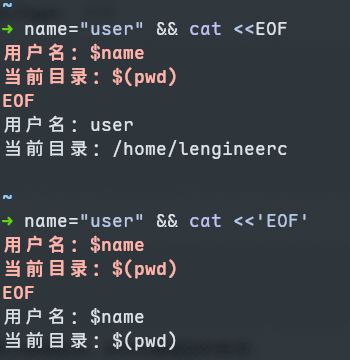
默认情况下会自动展开变量
            name="user"


            cat <<EOF


            用户名:$name


            当前目录:$(pwd)


            EOF
里面的$name和$(pwd)会被实际值代替。
给结束标记加引号变量就不会自动展开
            cat <<'EOF'


            用户名:$name


            当前目录:$(pwd)


            EOF
<<<
又叫here string,把一段字符串作为标准输入(没见过几个脚本用的,了解就行)。
            grep hello <<< "hello world"


            # 字符串变量也可以


            text="hello world"


            grep hello <<< "$text"
<<< 是 Bash/Zsh 功能,不属于严格 POSIX Shell
如果使用#!/bin/sh,一般写
printf '%s\n' "$text" | command
管道符
|,把左边命令的标准输出接到右边命令的标准输入
            printf '%s\n' "c" "a" "b" | sort


            # 数据流


            # printf 的 stdout → sort 的 stdin
/dev/null
写进去的内容会被丢弃
- 丢弃普通输出:
command > /dev/null
- 丢弃错误:
command 2> /dev/null
- 全部丢弃:
command > /dev/null 2>&1